
MacBook Charger Wattage: Choosing a Portable Power Bank
By Robert PetersonYour MacBook is portable. With a suitable USB-C power bank, your charging setup can be, too. Techsmarter 65W and 100W TSBar models bring battery reserve to compatible MacBook setups, with useful phone-charging features alongside laptop output. Choose around your Mac model and the work you do away from an outlet.
Use the model recommendation as your starting point
MacBook Air and MacBook Pro models do not all have the same charging requirements. Even within a product family, model year and configuration matter. Record your exact computer model before searching for a portable charger.
Apple’s adapter guide lists recommended adapters and explains that a USB-C Mac can use higher- or lower-wattage USB-C power sources. For the best charging experience, Apple recommends at least the wattage specified for the model. That is a useful reference when comparing portable power.
Separate three questions
- Will it connect? Confirm that the selected connection supports charging your Mac.
- Will it meet your workload? A source that adds charge while the computer rests may behave differently under heavy use.
- How much reserve does it carry? Output watts describe power, while battery capacity describes the available reserve.
These questions prevent a common mistake: choosing a large-capacity pack with an output that does not meet the intended charging task.
Compare 65W and 100W Techsmarter options
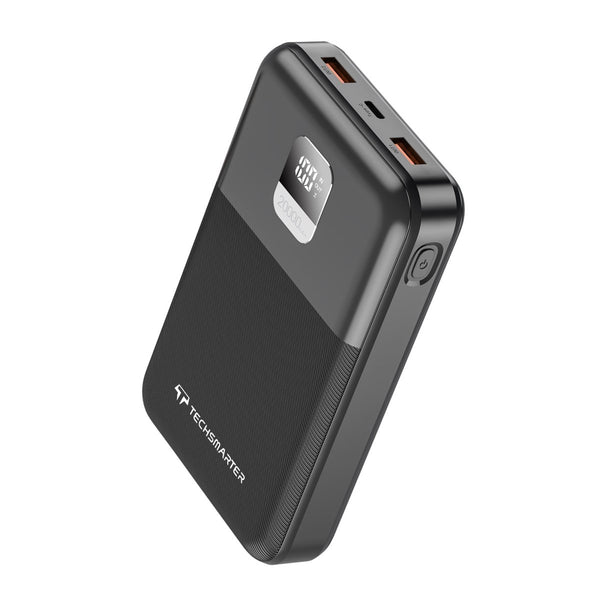
The TSBar 20,000mAh 65W and TSBar 20,000mAh 100W offer different maximum USB-C outputs at the same advertised capacity. Choose by your model’s requirements, rather than assuming 100W means a larger battery.
Choose a power bank whose supported output suits your MacBook’s charging requirement and workload. A 65W or 100W bank supplies up to its rated power; a 140W charging mode uses a 140W-capable source and supported cable.
Check the whole cable path
Use a cable rated for the power the setup requires. A dock or hub between the bank and computer may change how much power reaches the Mac, so start by checking a direct supported connection. For a MagSafe charging path, verify the specific cable and Mac combination with Apple’s instructions.
When other devices share the bank, consult its simultaneous-output specifications. The maximum for one port may not be the power available to that port with every output occupied.
Plan a realistic mobile work session
Test with the apps you normally use before depending on the bank for an important meeting. Note whether the battery percentage rises, holds steady or falls. This practical check complements the specifications and helps you decide when to recharge the bank.
Read our 65W versus 100W comparison for the broader buying decision, or send Techsmarter support your Mac model and intended workload.
More options for your setup
Compare charging performance and everyday features
| Feature | TSBar 20K 65W PPS | TSBar 20K 100W PPS |
|---|---|---|
| Capacity | 20,000mAh | 20,000mAh |
| Estimated full phone charges* | About 2.9 | About 2.9 |
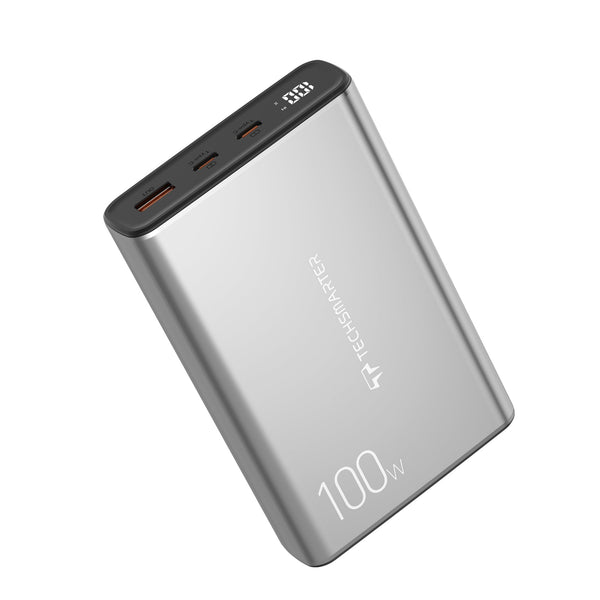
| Maximum wired output | Up to 65W USB-C PD | Up to 100W main USB-C PD; second USB-C up to 30W |
| Wireless charging | Wired charging | Wired charging |
| MagSafe-compatible attachment | No magnetic attachment | No magnetic attachment |
| One-hour fast charging for compatible phones | Yes — compatible phones with the supported cable and charging mode | Yes — compatible phones with the supported cable and charging mode |
| Connections | 1 USB-C, 2 USB-A | 2 USB-C, 1 USB-A |
| Laptop charging | Compatible USB-C laptops up to the port’s supported output | Compatible USB-C laptops, up to 100W |
| Waterproof / protection rating | IP rating unspecified | IP rating unspecified |
| Convenience features | Digital display; PPS | Digital display; PPS |
| Ideal use | Everyday laptop and phone kit | Higher-output laptop kit |
*Illustrative estimates use a 5,000mAh phone battery at 3.85V, power-bank cells at 3.7V and an assumed 75% energy transfer: bank mAh × 3.7 ÷ 1,000 × 0.75 ÷ 19.25. Recharge counts vary with phone, charging method and use; wireless charging can yield fewer charges. A decimal includes a partial recharge.
Use a cable and charging mode supported by your device. Power is shared when several outputs are in use. A dash means the one-hour phone-charging feature is unspecified for that model.
Use Apple’s adapter examples to narrow the choice
Apple’s adapter recommendations help match a MacBook with portable USB-C power. The table connects those recommendations to the 65W and 100W options in Techsmarter’s laptop range.
| Mac model family | Apple adapter examples | Power-bank implication |
|---|---|---|
| MacBook Air, 2018–2021 | 30W USB-C | Start with compatible USB-C PD and enough reserve. |
| 13-inch MacBook Pro, 2016 or later | 61W USB-C | A compatible 65W setup is a wattage starting point. |
| 14-inch MacBook Pro, 2021 or later | 67W, 70W or 96W, depending on model | Compare the exact model; 65W is below those listed adapter ratings. |
| 16-inch MacBook Pro, 2021 or later | 140W | Up to 100W available from a 100W power bank; 140W modes require a 140W-capable source. |
Apple’s Mac adapter guidance provides the reference ratings above. Choose a supported cable and enough output for your normal workload; a direct connection gives your laptop a straightforward charging path.
Frequently asked questions
Does every MacBook need a 100W power bank?
No. Requirements vary by model and charging goal. Start with Apple’s recommendation for your Mac.
Can a higher-output bank damage a compatible USB-C Mac by forcing its maximum power?
In a compatible USB-C PD setup, power is negotiated. The source’s maximum is not a fixed amount sent to every device.
Is a larger battery always faster?
No. Capacity and charging output are separate specifications.
Keep the mobile work kit versatile
The TSBar 20K 65W PPS suits compatible lower-power laptop setups, while the 20K 100W PPS offers more main-port output and a second USB-C connection. Both add PPS fast charging for compatible phones, making the same battery pack useful between meetings, on the journey and after work.
Need help with your setup? Email support@techsmarterusa.com with your device model.
Sources and product details
- Apple: use a power adapter with your Mac
- TSBar 20,000mAh 65W USB-C Laptop Power Bank specifications
- TSBar 20,000mAh 100W USB-C Laptop Power Bank specifications
Techsmarter model details are available on the product pages linked throughout this guide.