
A Portable Charging Kit for Client Visits and Field Work
By Robert PetersonThe next appointment is across town, and your laptop still has a presentation to deliver. A well-chosen Techsmarter portable charger keeps battery reserve in your work bag without turning it into a drawer full of adapters. Build your kit around the phone, tablet or laptop that carries your working day.
Choose your priority device
For some people, the phone is the office: directions, calendar, client messages and photographs all live there. Others need a tablet for forms or a laptop for estimates and presentations. Identify which device would disrupt the day most if its battery ran low.
Build around that priority first. A magnetic phone pack can make brief top-ups convenient, while a laptop requires a suitable charging connection and output. Avoid making the largest advertised capacity your only selection rule.
Pack three working connections
Think of the kit as three connections: outlet to bank, bank to priority device, and bank to any secondary device. Test all three. Label cables if your bag contains several that look similar but have different capabilities.
- Carry the cable that works with your highest-priority device.
- Check that your wall adapter supports the bank’s input requirements.
- Keep essential connectors accessible without emptying the bag.
- Confirm whether accessories such as a tablet keyboard affect your charging route.
Match the product to the work pattern
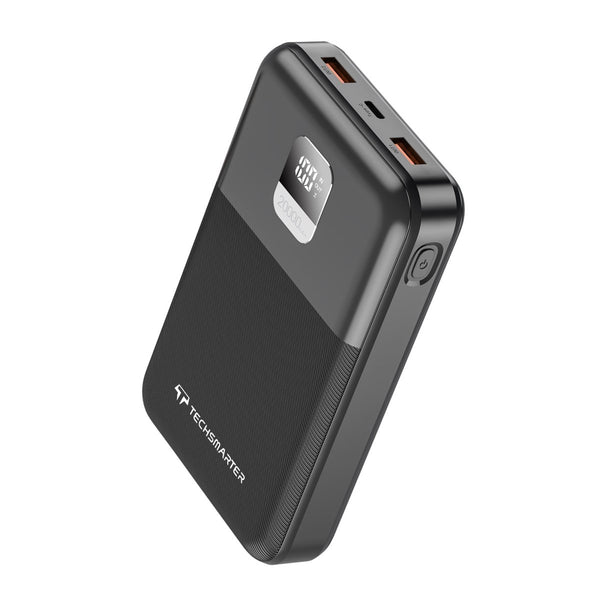
The TSBar 20,000mAh 65W is an option for a compatible USB-C laptop setup. Compare the laptop’s needs and the bank’s shared-output behavior if you also connect a phone.
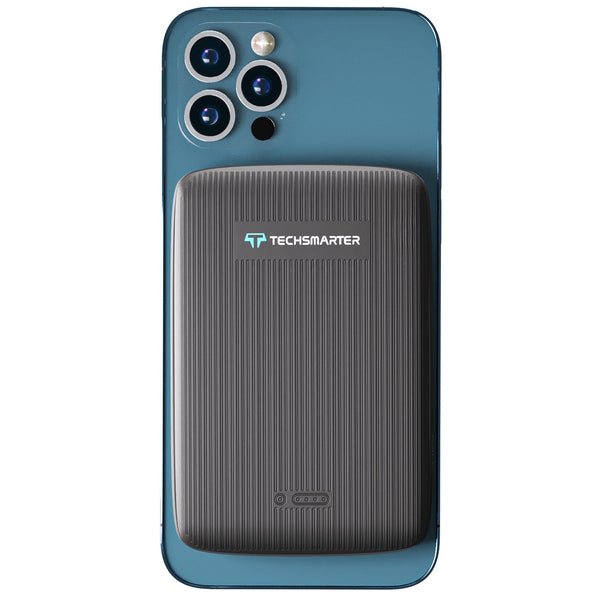
The MagBoost 10K brings magnetic wireless convenience to a supported phone and case. Choose it for a phone-first workday; choose a TSBar laptop power bank when a compatible computer is central to the kit.
Make breaks work for you
Use a quiet break to check remaining charge and reconnect the priority device. Keep the bank and cable placed so they will not fall or pull a device off a table. Before packing up, account for every component rather than leaving a charger under a meeting-room desk.
If you work from a parked vehicle, follow the equipment’s temperature and storage instructions and avoid leaving batteries in a hot vehicle. Plan charging while stationary rather than handling cables or screens while driving.
Reset the kit at the end of the day
Recharge the equipment, check cables for damage and put the tested combination back together. A spare cable can be useful, but only if it works with the device you need. Keep a short note of your device models and preferred ports so replacing a lost component is straightforward.
For dusty or outdoor jobs, see our contractor charging guide. For a laptop-heavy day, start with the laptop power comparison.
More options for your setup
Compare charging performance and everyday features
| Feature | TSBar 20K 65W PPS | MagBoost 10K |
|---|---|---|
| Capacity | 20,000mAh | 10,000mAh |
| Estimated full phone charges* | About 2.9 | About 1.4 |
| Maximum wired output | Up to 65W USB-C PD | Up to 18W USB-C and 18W USB-A |
| Wireless charging | Wired charging | Up to 10W listed; actual phone rate varies |
| MagSafe-compatible attachment | No magnetic attachment | Yes — supported MagSafe-equipped phones and magnetic cases |
| One-hour fast charging for compatible phones | Yes — compatible phones with the supported cable and charging mode | — |
| Connections | 1 USB-C, 2 USB-A | USB-C, USB-A and magnetic wireless |
| Laptop charging | Compatible USB-C laptops up to the port’s supported output | Designed for phone charging |
| Waterproof / protection rating | IP rating unspecified | IP rating unspecified |
| Convenience features | Digital display; PPS | Magnetic attachment |
| Ideal use | Everyday laptop and phone kit | Magnetic phone charging away from outlets |
*Illustrative estimates use a 5,000mAh phone battery at 3.85V, power-bank cells at 3.7V and an assumed 75% energy transfer: bank mAh × 3.7 ÷ 1,000 × 0.75 ÷ 19.25. Recharge counts vary with phone, charging method and use; wireless charging can yield fewer charges. A decimal includes a partial recharge.
Use a cable and charging mode supported by your device. Power is shared when several outputs are in use. A dash means the one-hour phone-charging feature is unspecified for that model.
Pack for the job between appointments
| Role | Kit item |
|---|---|
| Main work device | Compatible laptop power bank or phone-focused magnetic battery pack |
| Backup connection | The tested cable for that exact device |
| Refill the bank | A compatible wall adapter and input cable |
| Record for replacements | Model names, chosen ports and cable ratings |
For a phone-first day, compare MagBoost. For estimates or presentations on a laptop, select USB-C output first. A portable charger that fits the actual appointment routine is more useful than unused capacity. The desk-to-travel kit covers the wall-powered portion of the setup.
Frequently asked questions
Should I carry separate phone and laptop banks?
It depends on your devices and workflow. A suitable multi-output bank may serve both, but check power sharing and carrying convenience.
Can a magnetic phone pack charge my laptop?
Do not assume that it can. Check the exact model’s wired output against the laptop’s requirements.
What is the most useful pre-trip check?
Test the actual bank, cables and devices together, then leave with the bank recharged.
Make every item in your work bag count
Choose a TSBar PPS laptop power bank when your laptop and compatible phone need portable charging. For phone-first appointments, MagBoost adds magnetic convenience and a choice of stand formats. A useful charger, the right cable and a way to refill the bank make a simple, versatile daily kit.
Need help with your setup? Email support@techsmarterusa.com with your device model.
Sources and product details
- Techsmarter laptop charging guide
- TSBar 20,000mAh 65W USB-C Laptop Power Bank specifications
- MagBoost 10,000mAh Magnetic Power Bank specifications
Techsmarter model details are available on the product pages linked throughout this guide.